Ship to Ship Transfer
Ship to Ship (STS) transfer is the process of two ships sailing close to each other, enabling the method of transferring goods/cargo between the ships, without the need for porting.
Such transfers can exponentially increase the difficulty of tracking certain containers between ports.
As a result, it is important to keep track of ships that exhibits behavior closely related to that of STS transfers.
This article will explain a high level view of how to interact with the Gatehouse Maritime API to create, read, update, or delete STS detector configurations, with high level illustrations of how to do it.
Content overview:
Detector Operations:
- Create an STS Detector Configuration
- Get single Detector Configuration
- Get all Detector Configurations
- Update Detector Configuration
- Delete Detector Configuration
Event Operations:
- Get all Events
- Get all Current Events
- Search Events by MMSI
- Get Event by ID
- Get Tracks from Event
- Acknowledge Event
Create an STS detector Configuration
The creation of an STS detector configuration is done by specifying the several parameters in a JSON formatted description of the configuration, which should be specified in the payload.
The payload contains several parameters that describes the detector itself and the bounds of when to notify the user of an STS event.
There are several parameters in greater detail in the endpoint page (Link here); however, the most important is the distance between the ships and the time window of how long they should be close together.
The distance-between-ships parameter describes the number of meters for the ships to be considered ‘close’ and start the time window.
The time-window parameter describes is the bound of minutes in sequence that the ships are considered close and if the time that the ships have been considered ‘close’ exceeds the bound, then a notification is sent to the user.
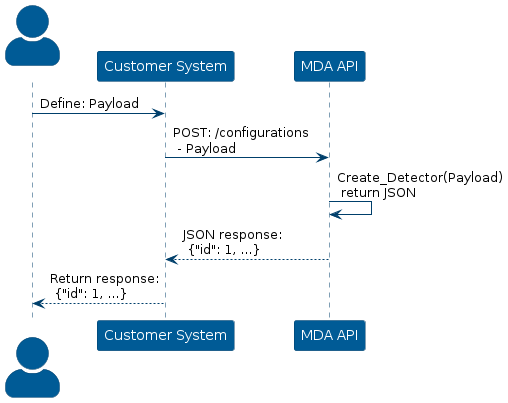
To create a detector in the MDA system, construct a POST request with a payload describing the several parameters of the detector and the API will return a JSON formatted response with the description of the detector itself.
The following image depicts the process of sending a request to the API and getting a response:
Get single Detector Configuration
To get the configuration of a single detector, the id of the detector should be known.
The id is specified as a parameter in the path.
/configurations/{id}Then, construct a GET request via the url and the MDA system will return with a JSON formatted response where it either details the configuration or it will show that it could not recognize the id.
The following image depicts the process of getting the details of a configuration.

Get all Detector Configurations
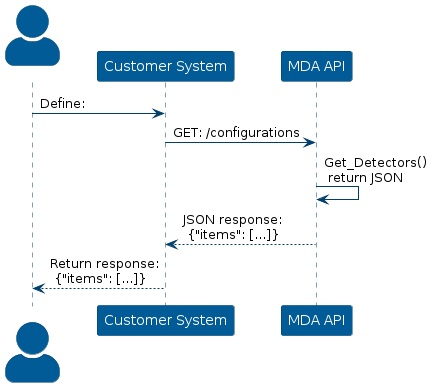
To get the configurations of all detectors in the MDA system, both active and inactive, construct a GET request to the url:
/configurationsThen, the API will respond with a JSON object containing all detectors and their details.
The following image depicts the process of getting the details of all configurations.
Update Detector Configuration
To update the configuration of an already existing detector, the id of the detector should be known.
Then, the id should be used in the url of the request
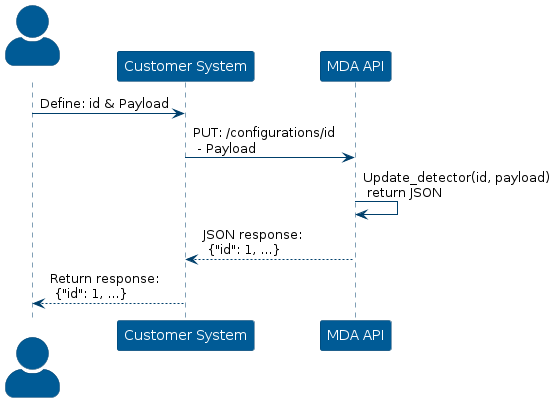
/configurations/idAdditionally, a payload also needs to be specified, containing a full description of a new and updated configuration.
Then, construct a PUT request via the url and attach the payload and the API will return a JSON response detailing the updated configuration and the parameters to describe it.
The following image depicts the process of updating a configuration of an already existing detector:
Delete Detector Configuration
To delete an already existing detector, the id of the detector should be known.
The request should be sent to the following endpoint:
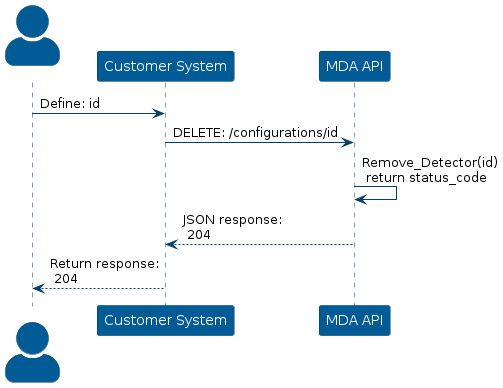
/configurations/idThen, send a DELETE request to the url with the specified id parameter and the API will return a status code of 204, meaning that the deletion was successful.
The following image depicts the process of deleting a detector in the system.
Get all Events
It is possible to request the API for all known events, both current and historical.
However, instead of getting all known events by the system, which could take a long time, a time period should be specified.
This way it is possible to get all events based on when it happened.
Additional two parameters should be specified in the request, namely the page number and page size.
Page size is the number of events shown in a single page and the page number is how many pages should the API return.
This means that the number of events can be bounded by both the time period and the page parameters.
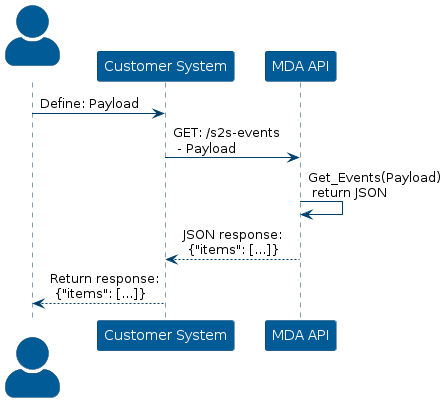
To do this, construct a GET request via the /s2s-events endpoint where the payload contains the previously named parameters and the API will respond with a JSON formatted response.
The following is a depiction of the process.
Get all Current Events
A current event depends on the configuration that captured the Ship to Ship event and whether the event has been deactivated.
The configuration will specify when the event will be specified as activated, meaning that the two ships has been within the configurations distance between the ships for the configurations time period.
Then the event will count as deactivated once the ships leave the configurations distance between the ships.
The event will then be considered current, during the time period between the event being activated and deactivated.
To get all current events, construct a GET request via the /s2s-events/current endpoint where the payload defines the page number and page size and optionally the configuration id to filter by.
Then the API will respond with a JSON formatted response containing all current events.
The page size defines how many events each page should contain and the page number defines how many pages the API should respond with.
The configuration id will specify all current events from that single configuration.
The following is a depiction of the process:

Search Events by MMSI
It is possible to get all events based on the MMSI of a ship.
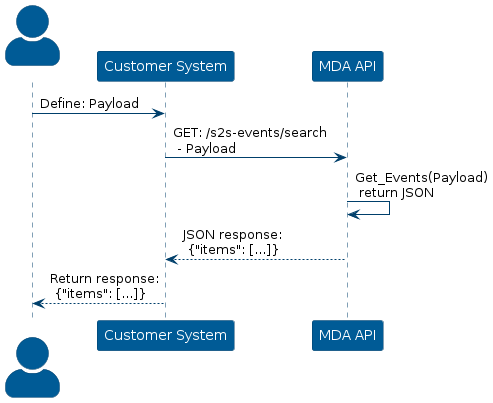
To do this, construct a GET request via the endpoint /s2s-events/search where the payload specifies the MMSI to search for, page number, and page size and optionally MMSI of the second ship and configuration id.
The MMSI to search for is the MMSI number of the ship to look through all events for.
The MMSI of the second ship is optional, but if specified, it will look through all events and search for all events where both the first and second MMSI appears in the event.
The page size defines how many events each page should contain and the page number defines how many pages the API should respond with.
The configuration id will specify all current events from that single configuration.
The following is a depiction of the process.
Get Event by ID
To get a specific event based on its ID, the ID of the event should be known beforehand.
Otherwise, if the ID is not known, see “Get all Event” or “Search Events by MMSI” to try and locate the event and get the ID.
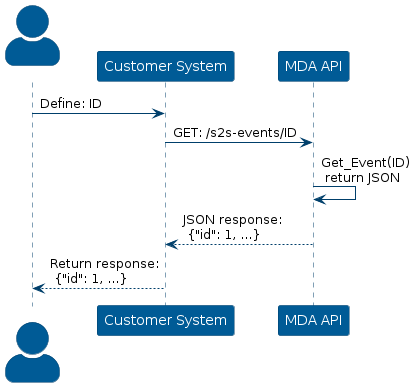
To do this, construct a GET request via the /s2s-events/{id} endpoint, where the id of the event is specified in the URL.
The following is a depiction of the process:
Get Tracks from Event
To get the Tracks from a specific event, the ID of the event should be known beforehand.
Otherwise, if the ID is not known, see “Get all Event” or “Search Events by MMSI” to try and locate the event and get the ID.
A Track is the historical trajectory of the vessel, which is a set of points with information about the vessel at each point.
The Track in the context of an event is then the historical trajectory of both vessels in the Ship to Ship event.
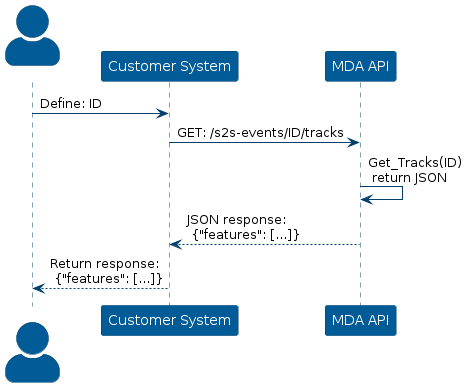
To do this, construct a GET request via the /s2s-events/{id}/tracks endpoint where the id of the event is specified in the URL and the API will respond with a feature list of several points and properties that detail the information of the ship at that point.
The following is a depiction of the process:
Acknowledge Event
It is possible to mark an event as Acknowledged.
What an acknowledged event represents is be defined by the user group.
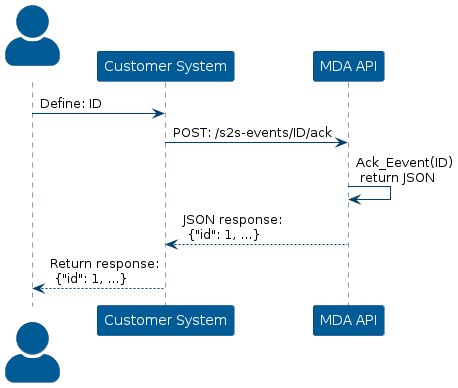
To do this, construct a POST request via the /s2s-events/{id}/ack endpoint where the ID of the event is specified in the URL and the API will respond with the updated configuration as a JSON formatted response.
It should be noted that the action is not reversible, meaning that once the event has been marked as Acknowledged it cannot be reverted to not acknowledged.
Additionally, the acknowledgement time stamp is handled on the server-side, such that the fields of the configuration can not be spoofed.
The following is a depiction of the process: