GPS Lost Configurations
In recent years, GPS jamming and spoofing have escalated from isolated disruptions to a persistent threat in maritime regions worldwide. Areas such as the Gulf of Finland, the Red Sea, and the Mediterranean have seen a dramatic rise in interference events, disrupting navigation, posing security risks, and putting both vessels and critical infrastructure at risk.
The GPS Lost Detector scans a defined time range to identify vessels that lose their GPS signal and visualizes these events in a grid map highlighting areas with frequent signal loss. This supports the detection of GPS jamming, spoofing, and other navigation disruptions.
This article will explain a high level view of how to interact with the Gatehouse Maritime API to create, read, update, or delete GPS Lost configurations, with high level illustrations of how to do it.
Content overview:
- Create a GPS Lost Configuration
- Get Results from a GPS Lost Configuration
- Delete GPS Lost Configuration
- Update GPS Lost Configuration
- Get All GPS Lost Configurations
- Get All GPS Lost Instances
Create a GPS Lost Configuration
The creation of a GPS Lost configuration is done by specifying the several parameters in a JSON formatted description of the configuration, which should be specified in the payload.
The request is then send to the API, which will respond with a JSON formatted description of the generated configuration. It should be noted that the API will specify the parameters id, uuid, created_at, etc. itself and is not needed by the user.
Below is a high-level image describing the process:

Get Results from a GPS Lost Configuration
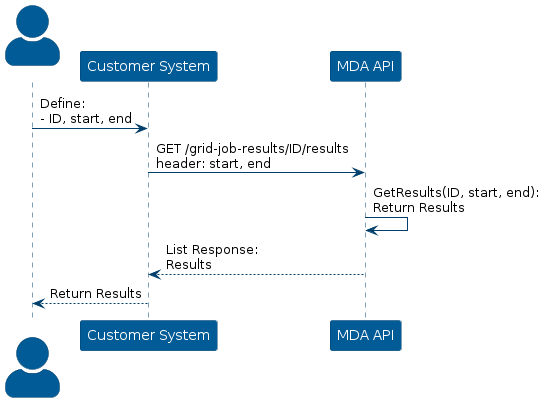
The results of the GPS Lost configurations results are stored in the API and can be retrieved by making an API request.
The request requires the ID of the configuration that is referred to, a start time and an end time to specify what time ranges the results should lie within. The API will respond with a list of JSON objects that defines the grid of cells and how many signals has been lost within each cell.
Below is a high-level image describing the process:
Delete GPS Lost Configuration
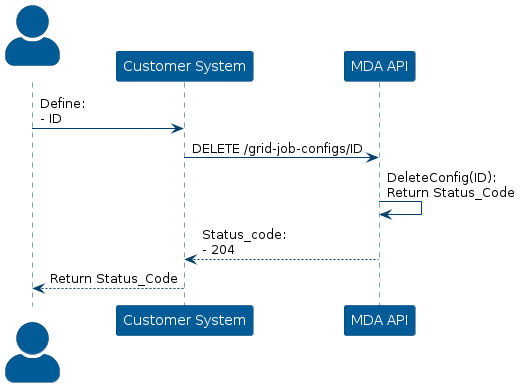
The API stores all created GPS Lost configurations and can be deleted by constructing a DELETE request together with the ID of the configuration
The ID of the configuration should be specified in the header of the request, and the API will only respond with a status code of 204.
Below is a high-level description of the process:
Update GPS Lost Configuration
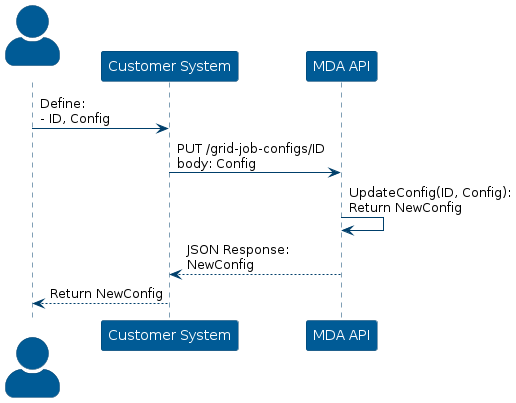
The API stores all GPS Lost configurations which can be altered through a PUT request with the ID of the configuration and the updated configuration.
The ID of the configuration should be specified in the header, and the updated configuration should be a specification of a new object in JSON format and should be specified in the payload. The API will respond with the newly generated object, which is stored in the API.
Below is a high-level description of the process:
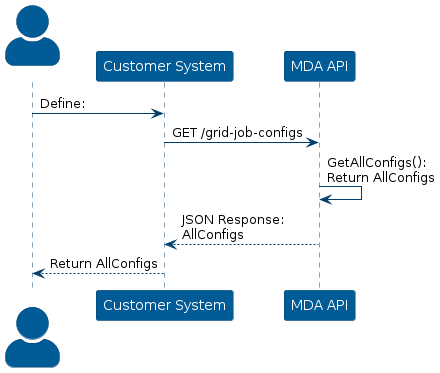
Get All GPS Lost Configurations
If some information about a configuration is not known at a given point, it is possible to get all GPS Lost configurations, which should contain the information.
To acquire the information, a GET request is sent to the API which will respond with a JSON object containing all specifications of the configurations. The request should specify the number of pages and the page size in its’ header.
Below is a high-level image describing this process:
Get All GPS Lost Instances
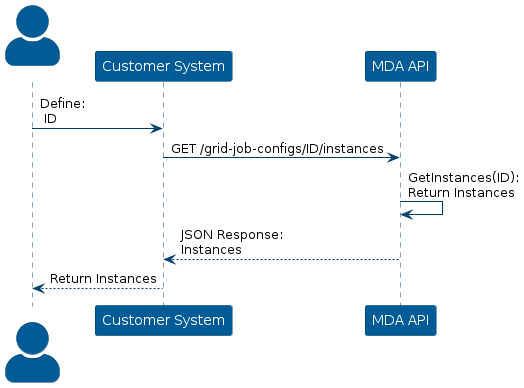
Each configuration stores its results as job instances, which can be retrieved via a GET request to the API.
The request should specify the ID of the configuration in its’ header and then the API will respond with a JSON object containing all job instances of that configuration.
Below is a high-level image describing the process: